How I Built an Automated YouTube Note-Taker
Turning hours of video into timestamped Notion notes, automatically, after three failed attempts that taught me how to actually do it.

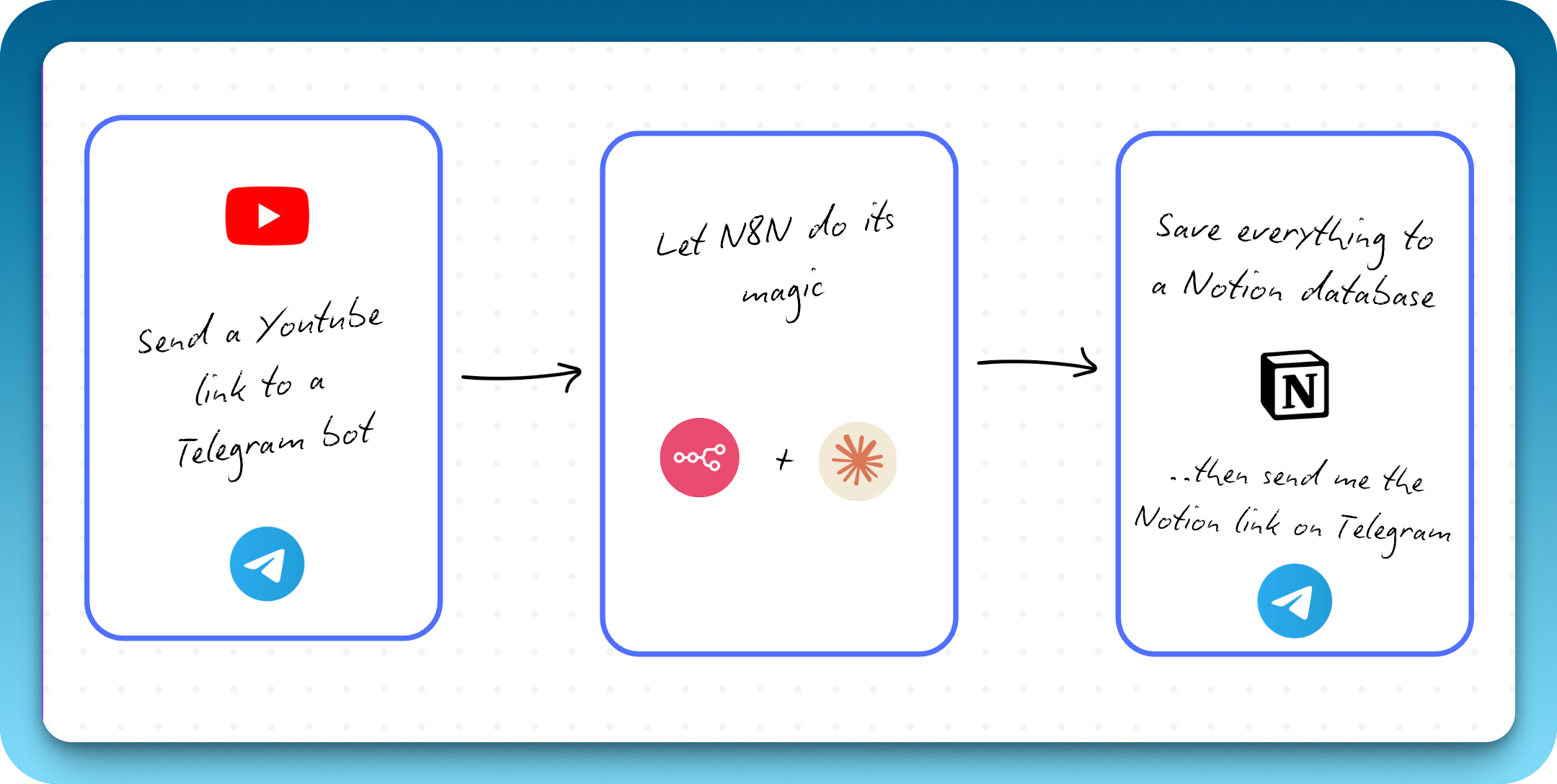
From Three Failed Attempts to Something That Works
I watch a lot of YouTube. Mostly automation tutorials and founder interviews. I’d watch something good, think I need to remember this, and forget all of it by the weekend.
What I wanted was a way around this. I needed to be able to ‘save’ a youtube video somehow, and make it easy to be referenced.
So i thought: a Youtube note taker. Better yet, a two-click only Youtbe notetaker.
The plan: Create a telegram bot. Paste a YouTube link, get back timestamped notes saved to my Notion so that I could actually find it again. I built it.
It took four tries to get there. Three of them failed.
The Vision: What I Wanted to Build
The concept was simple:
-
Send a YouTube link to a Telegram bot
-
Get back detailed notes with clickable timestamps, key takeaways, and curated resources
-
Have everything automatically saved to a Notion page.
The tools I chose:
-
n8n for workflow automation (self-hosted on Hostinger)
-
OpenRouter for access to Claude 4.5 Sonnet and other AI models
-
RapidAPI for fetching YouTube transcripts and metadata
-
Telegram as my interface
-
Notion as my knowledge repository
None of that turned out to be the hard part.
Part 1: The First (Failed) Attempts at Getting a Transcript
My first thought was to scrape the transcript off a website. I’d used n8n’s HTTP Request node before, so I pointed it at a transcript site like youtubetranscripts.com with the video URL and waited for the text to come back.
What came back was this:
<!DOCTYPE html>
<html lang="en">
<head>
    <meta charset="UTF-8">
    <title>YouTube Transcript</title>
    <style>
        body { font-family: Arial, sans-serif; }
        .transcript { ... }
    </style>
</head>
...
Basically, nothing usable.
Pages of HTML and CSS with the transcript buried somewhere inside. I swapped nodes and tried two other transcript sites. Each one handed back a different mess of markup.
💡 Lesson #1: Scraping consumer sites is brittle. The page layout is built for human eyes, and it changes whenever the site owner feels like it. I needed a data source that wasn’t going to move under me.
Part 2: The “Perplexity” Pivot - Letting AI Do the Heavy Lifting
Next idea: let the AI find the transcript itself. n8n gave me access to web search tools like Tavily and Brave Search. I figured I’d hand one to my AI Agent and let it deal with the mess.
I installed the Tavily node, connected it to my AI Agent, and updated my prompt:
When given a YouTube video link, use web search to find and retrieve the video's transcript, then analyze it...
I sent a test YouTube URL through the workflow.
The error:
{
  "errorMessage": "Bad request - please check your parameters",
  "errorDescription": "Query cannot consist only of site: operators. Please provide search terms."
}
Again, no bueno.
The AI was passing the raw YouTube URL straight to Tavily as a search query. Tavily wanted search terms, not a link. To make it work I’d have to convert the URL into something searchable first, or drop the approach entirely.
I switched models, since Perplexity Sonar didn’t support tool use, and kept adjusting how Tavily was configured. The results stayed inconsistent no matter what I changed.
💡 Lesson #2: AI tools aren’t magic. Handing an agent a tool isn’t the same as the agent knowing how to use it. You have to understand the tool yourself and shape the input it expects.
Part 3: The API Breakthrough - Finding the Right Tool
I gave up on the clever routes and looked for an API built for this one job. I needed something free, or at least very cheap.
After some research, i found RapidAPI.
RapidAPI had an API called the YouTube Transcripts API. A single endpoint that returns clean JSON with the transcript text, the timestamps, and the duration.
I set up the HTTP Request node with the proper cURL parameters:
GET https://youtube-transcripts.p.rapidapi.com/youtube/transcript
?url={{ videoUrl }}
&videoId={{ videoId }}
&chunkSize=100
&text=false
&lang=en
Headers:
x-rapidapi-host: youtube-transcripts.p.rapidapi.com
x-rapidapi-key: YOUR_API_KEY
It worked on the first call. The JSON came back clean:
{
  "lang": "en",
  "content": [
    {
      "text": "These are the five steps I always use when building AI agents...",
      "offset": 80,
      "duration": 23840
    },
    ...
  ]
}
Finally.
With a data source I could trust, the core workflow came together:
-
Telegram Trigger → Receives YouTube link
-
IF Node → Validates it contains “youtu”
-
Code Node → Extracts video ID from URL
-
HTTP Request → Calls RapidAPI for transcript
-
Code Node → Formats transcript with timestamps
-
AI Agent → Analyzes and creates notes
-
Notion Node → Saves the result
-
Telegram Reply → Sends confirmation with Notion link
💡 Lesson #3: Reach for an API before anything else. The data comes back structured and predictable, and someone whose actual job is uptime keeps the endpoint alive.
Part 4: From Generic Summaries to Detailed Notes
Having the transcript was step one. Now the AI had to turn it into something worth keeping. My first prompt was one line:
Analyze this YouTube transcript and create a summary. What it produced was a flat overview:
“This video discusses five steps for building AI agents. The speaker covers foundations, identifying opportunities, process mapping, workflows vs agents, and guardrails.”
It was accurate and useless. I didn’t want a book report. I wanted the notes I’d write myself if I’d sat through the whole thing.
The Great Prompt Engineering Journey
This is where most of the hours went. The changes that moved the needle, in order:
Change #1: Set the Role and Perspective
Instead of “summarize this,” I changed the opening to:
You are an expert note-taker who creates comprehensive, detailed notes from video transcripts. Your goal is to capture the substance, nuance, and creator's voice as if someone watched the entire video and wrote everything down.The output shifted. It started reading like a person writing things down rather than a press release.
Change #2: Content Type Detection
A tutorial needs different formatting than a podcast. So I added:
Detect the Content Type:
- Tutorial/How-to: Focus on step-by-step instructions and implementation
- Podcast/Interview: Extract stories, insights, and quotes
- Educational: Capture concepts, explanations, and frameworks
Now a how-to video got step-by-step structure and an interview got quotes and stories.
Change #3: Clickable Timestamps
I wanted timestamps I could click to jump straight to that moment in the video. The format I was after:
[2:30](https://www.youtube.com/watch?v=VIDEO_ID&t=150s)I added to the prompt:
Use clickable timestamps frequently. Format: [MM:SS](videoURL&t=XXXs) where you convert MM:SS to seconds.
Example: [2:30](videoURL&t=150s)
The Timestamp Hallucination Problem
Then the AI started inventing timestamps. It would tag a quote at 2:29 when the line actually showed up at 15:30. Every fabricated timestamp looked perfectly reasonable on the page.
It was generating timestamps from scratch instead of pulling the real ones out of the transcript.
The fix took a heavy-handed addition to the prompt:
**CRITICAL TIMESTAMP RULES:**
- ONLY use timestamps that appear in the transcript above
- NEVER make up, estimate, or fabricate timestamps
- When referencing content, find where it actually appears in the transcript
- If you're unsure, look back at the transcript to find the real timestamp
That kept it honest.
Change #4: Curated Resources via Tavily
Since I still had the Tavily search tool connected, I added:
### Curated Resources for Further Learning
Using web search, find and recommend 5-7 high-quality resources related to the main topics covered in this video.
Now the AI would search for related articles, books, and tools mentioned in the video and include them in the notes.
💡 Lesson #4: Your prompt is your program. The gap between mediocre output and useful output is how specific and constraint-heavy you make the instructions. Treat it like code.
Part 5: The Metadata Layer
The notes were solid but contextless. They didn’t say what the video was called or who made it.
I added a second RapidAPI call to fetch video metadata (title, channel, thumbnail, duration). Then I updated my prompt to start the notes with:

**"Video Title"** by Channel NameEvery note page got a visual header, so I could recognize it in Notion without opening it.
The Duration Conversion Problem The metadata returned duration in HH:MM:SS format (like 1:23:45), but I needed it in total seconds for the AI to reference. So I wrote a quick Code node:
const duration = $json.duration;
const parts = duration.split(':').map(part => parseInt(part, 10));

let seconds = 0;
if (parts.length === 3) {
  seconds = (parts[0] * 3600) + (parts[1] * 60) + parts[2];
} else if (parts.length === 2) {
  seconds = (parts[0] * 60) + parts[1];
} else {
  seconds = parts[0];
}

return { ...$json, lengthSeconds: seconds };
Now the duration reached the AI as a plain number of seconds.
Part 6: Error Handling - Making It Production-Ready
Some videos have captions disabled. RapidAPI goes down for maintenance now and then. When either happened, the workflow failed without saying a word.
I’d sit there waiting for a result that was never coming.
So I built in error handling.
The Setup:
-
On both RapidAPI HTTP Request nodes, I enabled “Continue on Fail”
-
After each API call, I added an IF node to check for errors
-
If an error was detected, the workflow would send me a Telegram message explaining the issue, then stop execution to avoid cascading failures
The error message looked like:
😞 **Captions Not Available**

Video: [YouTube URL]

❌ This video doesn't have public captions available or they're disabled by the creator.
💡 Lesson #5: A workflow you can rely on is one that fails out loud. When something breaks, it should tell you what broke and why.
Part 7: Choosing the Right AI Model
I tested several models on OpenRouter:
GPT-4o (fast but sometimes shallow)
Gemini 2.5 Pro (great for long videos, very affordable)
Claude 4.5 Sonnet (best overall for nuanced note-taking)
Claude 4.5 Sonnet won for this job:
- 200K context window - Handles even 2+ hour video transcripts
- Superior reasoning - Captures nuance and preserves the creator’s voice
- Excellent tool use - Works seamlessly with the Tavily search integration
- Natural writing style - The notes don’t sound robotic
Each video cost somewhere between $0.08 and $0.25 depending on length, which I was happy to pay.
Part 8: The Final Workflow
The finished automation:
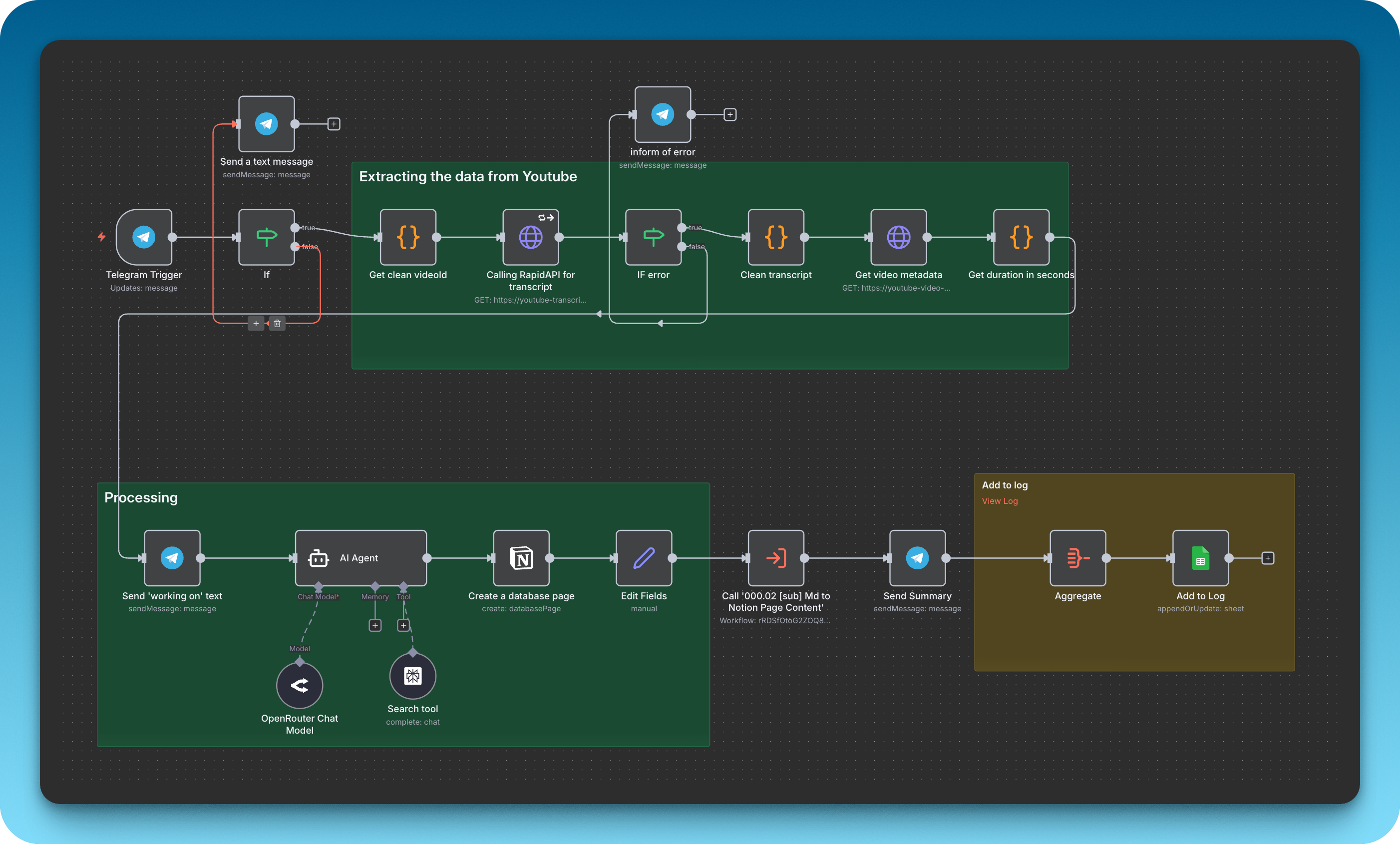
Telegram Trigger
↓
IF: Contains "youtu"?
↓
Code: Extract Video ID
↓
HTTP Request: Get Transcript (RapidAPI)
↓
IF: Error? → Send Telegram Error → Stop
↓
Code: Clean Transcript (format with timestamps)
↓
HTTP Request: Get Metadata (RapidAPI)
↓
IF: Error? → Send Telegram Error → Stop
↓
Code: Convert Duration to Seconds
↓
Send Telegram: "Working on it..."
↓
AI Agent (Claude 4.5 Sonnet + Tavily Tool)
↓
Create Notion Page
↓
Log to Google Sheets
↓
Send Telegram: Markdown link to Notion page
Link to finished notes takes 30 to 60 seconds.
What I Learned
-
Start simple, but expect to iterate. My first version was “send URL, get transcript, ask AI to summarize.” The final version is far more sophisticated because I kept finding gaps.
-
APIs beat scraping, always. The hours I wasted trying to scrape web pages could have been spent building features. APIs are worth the small cost.
-
Prompt engineering is 80% of the work. The difference between mediocre and excellent AI output comes down to how well you structure your instructions.
-
AI tools need guidance. You can’t just throw a tool at an AI and expect magic. You need to understand how the tool works and design your prompts accordingly.
-
Error handling is what makes it real. A workflow that fails gracefully and tells you why is worth far more than one that just breaks.
-
The best way to learn is to build something you’ll actually use. I built this because I genuinely wanted it. That kept me going through all the failed attempts.
The Result
Now when a video is worth keeping, I paste the link into Telegram. A minute later a message comes back with a link.
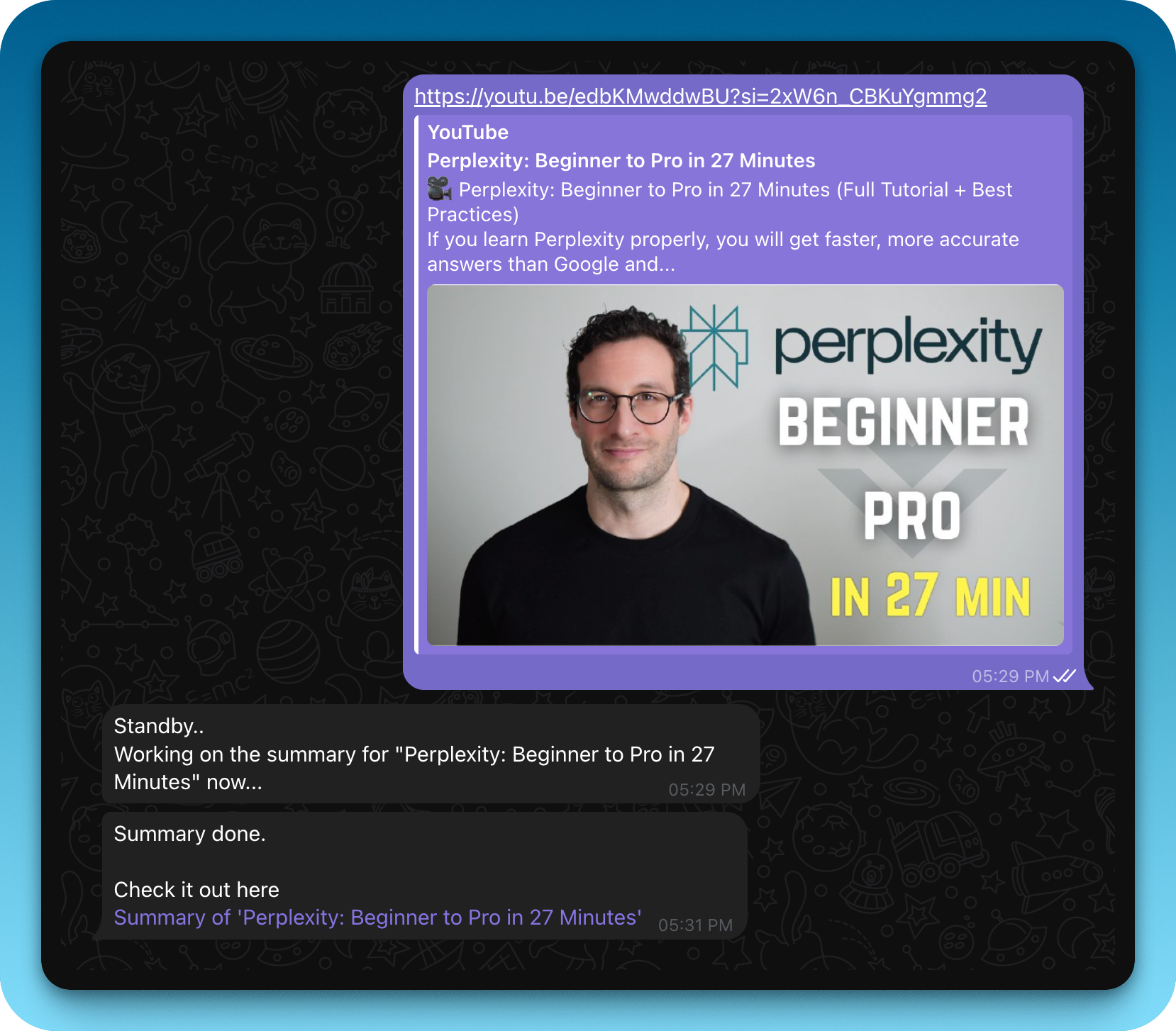
The link points to a Notion page with:
- A thumbnail and title
- Comprehensive notes with the creator’s voice preserved
- Clickable timestamps to jump to specific moments
- Key takeaways and insights
- Curated resources for deeper learning
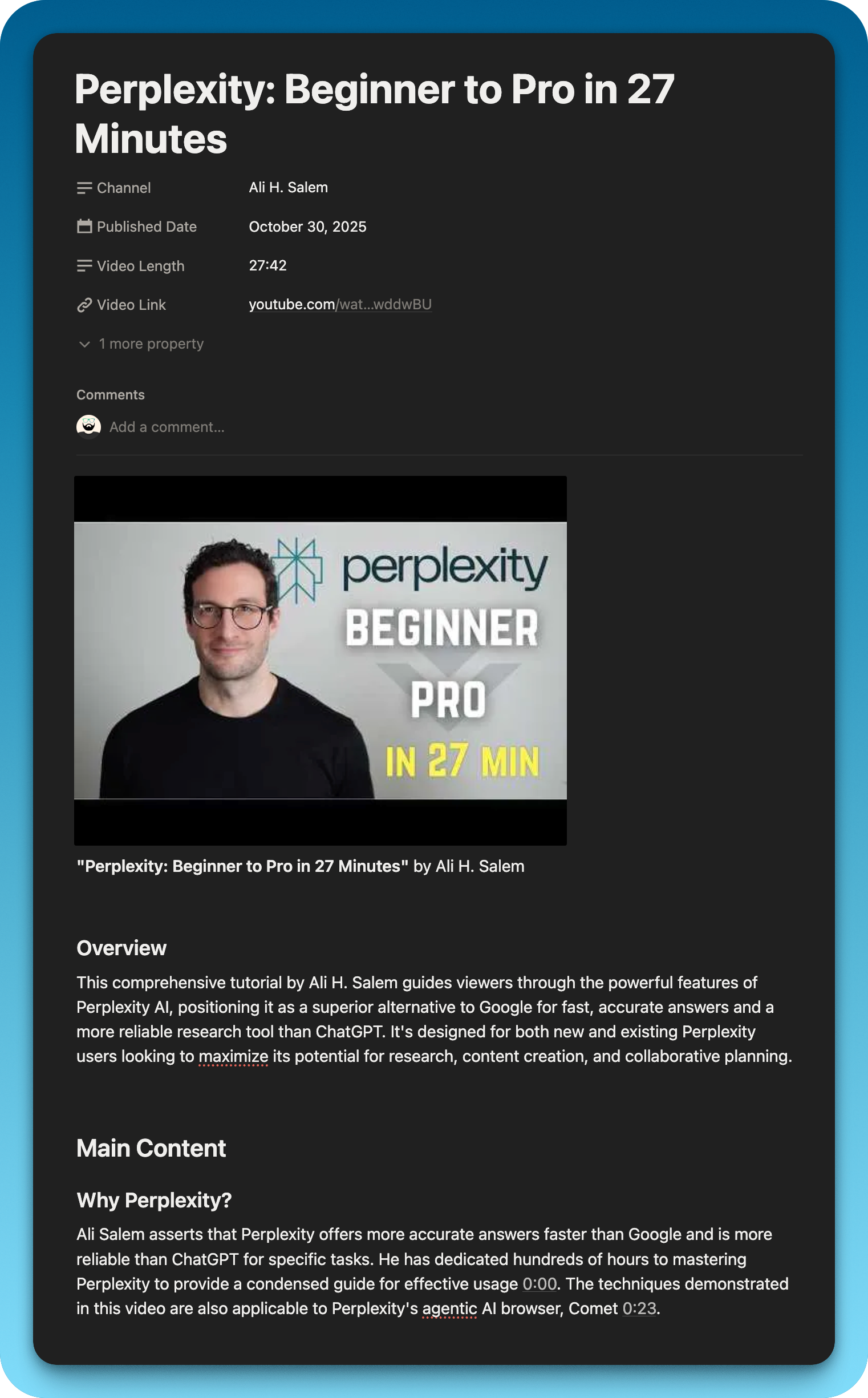
It changed how much actually sticks. The videos I watch end up in a knowledge base I can search later rather than evaporating by Friday.
If you want to build one yourself, start messy and throw out whatever isn’t working. Most of mine got built by breaking the version before it.
Appendix:
The Final Prompt
Here’s the complete prompt I use in the AI Agent node (cleaned up for readability):
You are an expert note-taker who creates comprehensive, detailed notes from video transcripts. Your goal is to capture the substance, nuance, and creator's voice.
---
VIDEO INFORMATION:
Title: {{ $json.title }}
Channel: {{ $json.author }}
Duration: {{ $json.lengthSeconds }} seconds
Video URL: {{ $json.videoUrl }}
FULL TRANSCRIPT WITH TIMESTAMPS:
{{ $json.transcript }}
---
CREATE DETAILED NOTES FOLLOWING THESE GUIDELINES:
**CRITICAL TIMESTAMP RULES:**
- ONLY use timestamps that appear in the transcript above
- NEVER make up, estimate, or fabricate timestamps
- Format: [MM:SS]({{ $json.videoUrl }}&t=XXXs)
- Convert MM:SS to seconds (e.g., 2:30 = 150 seconds)
START YOUR NOTES WITH:

**"{{ $json.title }}"** by {{ $json.author }}
---
1. Detect Content Type (Tutorial, Podcast, Educational, Review)
2. Preserve the creator's voice with direct quotes
3. Use clickable timestamps frequently
### Overview
Brief 2-3 sentence intro
### Main Content
Detailed notes organized by topic, with timestamps
### Key Takeaways
5-10 actionable insights with timestamps
### Curated Resources for Further Learning
Using web search, find 5-7 high-quality resources related to topics covered.
---
RULES:
- Be thorough (1,500-2,500 words)
- Only use real timestamps from the transcript
- Include specific examples, numbers, and details
- Write naturally, as if YOU watched and took notesThat’s the whole thing. If you build your own version, tell me how it goes.